
Narrowing Your Router Search Based on IOS Version
Turn your #CCENT and #CCNA home lab search upside down for today’s post. Instead of thinking “I need routers”, think about routers as simply a place to run router IOS. Then, think about what router IOS version you want to run in your lab. The routers are just a place where you can run instances of Cisco IOS software for routers.
Today, I’ll explore routers for your home lab, but focus on the IOS version. I’ll list some of the common routers used in home labs, the latest IOS mainline or T-train version supported, along with Wendell’s opinion of where you want to be with the IOS version.
Earlier posts in this series:
Breakdown: Best IOS Version for Common Used Routers
As someone new to Cisco, a typical CCNA candidate cannot possibly understand all the router model series, and specific router models, in Cisco’s long history. If you look long enough, you can find routers for sale online that Cisco quit actively selling 20 years ago or longer. These routers still power on, still run IOS, and can still be used to learn about some CCENT and CCNA topics. So, it’s hard to just search a site with “Cisco router” and sift through the detail to find the right router.
When Cisco quits supporting an old router model, Cisco simply no longer compiles IOS images for that router model. So, there is a literal IOS version that is the most recent IOS version that can be used on that router. From an exam prep perspective, that IOS is the best IOS to have, because the more recent the IOS, the more new features supported.
Figure 1 shows some of the numbers of the more popularly used router models for Cisco home labs, plus the most recent IOS version supported on that router.
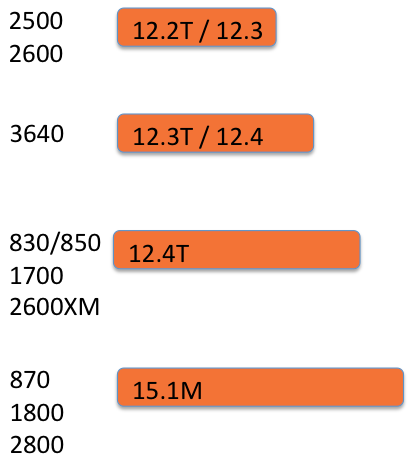
Figure 1: Common Used Router Models and Most Recent IOS
Prices
If you just look at Figure 1, and had no other constraints, then using the routers at the bottom, with the most recent IOS possible, would be the best choice. But you always have to introduce reality to the decision, and pricing of course is a big part of that reality.
My co-worker Chris is working hard at collecting some real data to update my eBay.com price estimates for my web site. In the near future, I’ll have some updates on those prices. For now, I’ll use some general estimates to give us a general idea of prices when thinking through whether you would spend a little more to get a little better IOS version.
For the sake of discussion, I have created a price estimate for a router in each of four categories: ancient, really old, old, and not-that-old. Just like the prices posted at dev-site.certskills.com, the price is for a router with one Ethernet plus two serial interfaces. For example, if a router has built-in LAN and WAN interfaces, nothing is added, but for a router that has 1 LAN interface but no WAN interfaces, price estimate includes a serial WIC-2T.
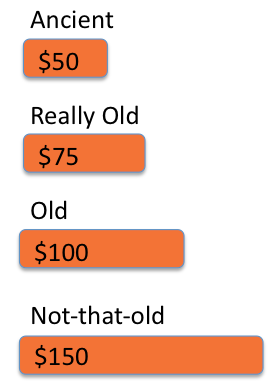
Figure 2: VERY General Price Estimate Just for Comparison Purposes
Now image that, after reading the first post in this series, you expected to buy three routers. Have you already blown your budget even with the ancient routers? Could you possibly afford the not-so-old? Those questions are important. However, today’s post focuses on one other important question:
What better IOS version could I get with a more recent/better router?
Wendell’s Opinion: Try to Afford a Platform for at Least 12.4T
In the previous post, I worked through some of the issues surrounding whether you needed IOS 15.something, or not. Personally, I think IOS 15.something is nice, but not a requirement. For perspective, say my general price estimates happen to be perfect. So, you could get:
- Old routers, running 12.4T, for $100 each or $300 for the trio
- Not-so-old routers, running 15.1M, for $150 each or $450 for the trio
Which would you choose? Some would choose the first option, some the second, and some frankly would look at cheaper options, and that’s ok. Point is, that’s $150 difference to get from 12.4T to 15.1M. And what do you get? Not much. (I’ll get to more detail once I get the web page updates done, and post more in the coming weeks.) However, on the routers in the figures, with 15.1M instead of 12.4T:
You do get: More current syntax and output in show commands, including the better “show ip route” output with local routes.
You do NOT get: IOS licensing support, because while IOS 15 supports IOS licensing, it’s only on some platforms, which does not include these not-so-old models.
What would be nice is a list of features required for CCENT and CCNA, and what’s supported at each version. And guess what – I’m working on updating exactly those lists at my web site! Next post will begin to refer to those updated pages.
Wendell’s Opinion
All the options to build a home lab have some benefit to helping you learn. Even using the “ancient” routers helps: even some ancient 2501 routers (1 Ethernet, 2 serial) will let you configure IPv4, OSPF, EIGRP, ACLs, NAT, much of IPv6, and troubleshooting. Certainly the newest routers listed here are great to have, but they just cost more.
Given past experience, I think the routers that support a best IOS of 12.4T will end up as the best compromise, at least until the not-so-old routers (870, 1800, 2800) drop in price. In the mean time, figure 3 summarizes my opinion about these four general categories:
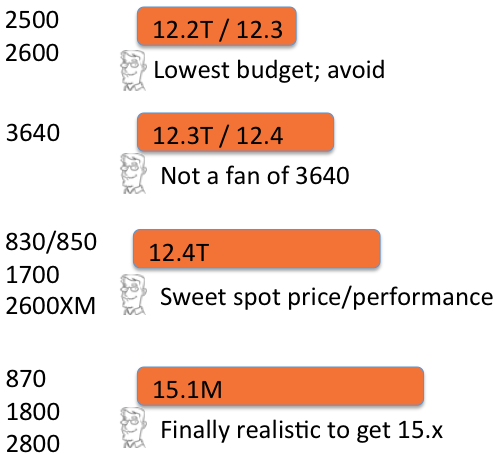
Figure 3: Wendell’s Opinion on Router Categories and IOS Versions
Conclusion
If you are working through this post real-time, start thinking in terms of buying an IOS version as much as a router model. The router model enables the interfaces possible, and the IOS versions possible, but the IOS version more directly dictates what features you can configure and test. Pick one or two of the categories from figure 1, where you will most likely sit when it comes time to spend money. Start getting a feel for finding the IOS version installed per the product as listed, interfaces included, and so on.