
IOS Version 15 for a Cisco Home Lab – or Not
A good home #CCENT and #CCNA home lab does not require IOS 15.x. There, I said it. Even though Cisco touts the new CCENT and CCNA as being based on IOS 15 (a pretty broad statement in itself), when you sit down to weigh the competing goals for your lab, version 15 is useful, but not a requirement. Today’s post develops these ideas a bit.
Other posts in this series:
A Brief Overview of IOS Version Numbers that Matter
I could write a whole book about how to build a home lab, and this one little section would probably get a whole chapter in the book. But to keep this blog post to a reasonable length, let me summarize a few facts, while admittedly leaving out some background:
- Cisco numbers IOS software “versions”, the major new releases of Cisco IOS software for routers, with two numbers, like 12.4, or “version 12.4”.
- Over time, Cisco creates new IOS releases inside each major version, making the IOS image files for each release available to their customers.
- Cisco creates multiple sets of IOS releases for each version, with each set called an IOS release train. Each train can focus on other needs Cisco has for releasing software, for instance, some trains may strive to keep the code stable, while others add every new feature and therefore risk more bugs.
- The only two trains we will discuss are the mainline train (which has no suffix letters after the version), and the T-train (with suffix letter T, e.g., “12.4T”).
- A T-train version has the same features – those topics you want to study – as the next mainline release. E.g.:
- 12.3 (mainline) and 12.2T support the same features
- 12.4 (mainline) and 12.3T support the same features
- 12.4T, the latest version T-train in version 12, stands alone for various reasons, at least in how it’s used for thinking about home labs.
- Yes, Cisco skipped versions 13 and 14 because off perceived bad luck in different cultures. 😉
- 15.0M was the next version (that we care about for home labs) after 12.4T.
Choosing an IOS Image in the Right Version, with the Right Features
When you look for used gear, you can look for the used router, but you also need to know what IOS image that router has installed. Most of you will not have the ability to download and upgrade that IOS to a new image. So, when you buy that router, you need to pay close attention to the IOS. When you pick an IOS version for a router in your home lab, you need to choose the right IOS version for several reasons:
- The Version Determines how Current the Commands Are: The more current, the more likely the commands work just like you will see on the exam, and in books.
- The Version Determines (in part) the Commands Supported: The IOS version in part defines what features are supported, and therefore what commands are supported.
- The Feature Set Associated with the IOS Image Determines (in part) the Commands Supported: Cisco adds features to each IOS based on the IOS feature set.
I’ll break down this first reason for the rest of this post.
IOS Versions Can Change Command Syntax and Output
Say you buy a used router, a 2501, with 12.3 IOS. If you then buy a brand new 2901 router, with the most recent M-train version (15.3M), you are five IOS versions behind on the 2501, at about a 10-year time span of when these IOS versions came into the market.
And you can still learn a lot for CCNA with that 2501 – but some of the commands may work a little differently.
When Cisco updates an IOS, the vast majority of the commands do not change. In particular, config commands often remain unchanged. The output of show commands changes in a higher percentage of commands, but many show commands do not even change. Even if the output changes, the changes often add new information, or change the format, but they do not remove information or change the meaning of information. In fact, most experienced network engineers do not even notice some of these changes unless they look at the output of the same command, in different IOS versions, side-by-side.
But changes do happen, so let me give a few examples:
- The ip access-group x [in|out] command. In earlier IOS versions, the “in” or “out” was optional (as shown here in square brackets), and if not listed, IOS assumed “in”. Somewhere around IOS 12.2 (that’s a guess – it’s an old memory in my skull), IOS changed to require us to type either “in” or “out”.
- ACL editing: Cisco has continued to update and improve IOS ACL support each version. However, IOS versions 12.2 and 12.3 saw a lot of improvements that Cisco included in the scope of CCNA at the time, namely ACL line editing, line numbers, and named ACLs. (Aside: to avoid this ACL mess today, use 12.4 mainline, or later IOS versions, and you should be good for current CCNA study.)
- The show ip route command: IOS changed the output of this command in one significant way starting at 15.0M. This command now lists “local” routes, which are routes on a local router about the local routers own interface IPv4 addresses. With older IOS versions, the output would not list the local routes. Here’s a sample from the ICND1 Cert Guide:
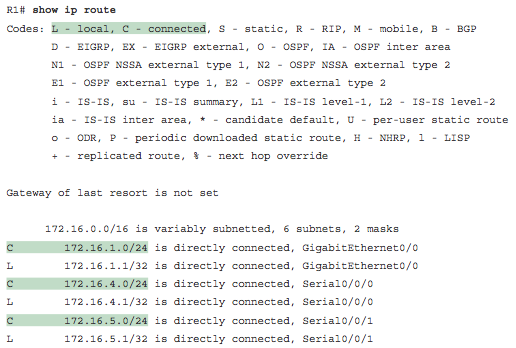
Example of the show ip route Command’s Local Routes
IOS 15: Not a Huge Deal for a Home Lab
Do you have to have a version 15.something IOS in your home lab routers to study for the new CCENT and CCNA exams? In my opinion, no. Here’s why:
Comparing IOS 15 to the most recent IOS 12 versions, Cisco has indeed changed the output of quite a few show commands. However, I only came across one change that would impact your study. Do you need to spend three times as much on your used routers just to get support for that one command? Probably not.
The one command that did change enough to matter, show ip route, can be learned by reading the book. If your lab has routers with say 12.4T, you won’t see those local routes. But the book shows several examples with the local routes included. And to be honest, I wouldn’t be surprised a bit if the exam still had a few questions that showed the old format without local routes either. To save a few hundred dollars on your lab, I think you can just do without.
Thinking about the used market, and the IOS versions supported by cheap used routers, can help put some perspective on the need vs. desire for version 15.0. IOS versions 12.4 and 12.4T are both current enough to avoid many historical command changes. IOS versions 12.4 and 12.4T both work on a variety of cheap used routers. To get 15.anything, you will need at least an 1800 series or 2800 series router, or a 87x router, all of which still cost into the hundreds per router even in the used market. Useful? Yes. Worth the money just to get to IOS 15.x? Maybe, but maybe not. I’ll develop that further over the next post or two.
Conclusions
For a CCENT or CCNA home lab for the 100-101, 200-101, and 200-120 exams:
- 15.x is not required, although it’s better than running older IOS versions
- 12.3/12.2T is probably a good absolute minimum (but not Wendell’s preference)
- 12.4/12.3T is noticeably better than 12.3/12.2T due to ACL support
- 12.4T is the sweet spot for the best of the “old” 12.x version, with many older routers supporting it
- If you really want IOS 15, many in the 1800/2800 series, and the 870 series, support up through 15.1M
- Pay close attention to show ip route if you go with a version 12 IOS.