
#CCNA and #CCENT Lab Topologies
To build a lab for #CCNA or #CCENT practice, you need to think about how many routers you need, how many switches, and how many interfaces of each type. To make those choices, you need to think about the topologies you can build, and what features need the larger topologies. Eventually, this kind of analysis lets you compare the cost to buy enough gear for each topology vs. the features that can be best practiced with progressively larger topologies.
Today’s post takes us through a discussion of some topologies for CCNA and CCENT, covering the basics for those of you early in your CCENT or CCNA studies.
Related posts:
The Big Concepts: Topologies, Interfaces, Functions
To begin, do not think about making an individual purchase. Do not start with the idea of thinking about buying a router, switch, or a cable. Instead, begin as follows:
- Think about some of the topics you want to study, like those in your CCENT or CCNA books.
- Think about the topology of routers, switches, PCs, and cables needed for an effective lab exercise with that feature. (If you are just starting out, you may not know enough to figure this part out on your own.)
- For a given topology, count the number of routers and switches needed
- For each device in a topology, count the number of each type of interface needed on each device in each topology
If you can get through these first four steps, you are closer to being ready to pricing our your options for buying used gear, plus you know the value you receive: the types of features you can practice depending on how much gear you buy.
To define terms, the word topology in this case refers to the conceptual drawings of networks like those you see in your cert study books. The figures include routers, switches, user devices like PCs, and cables that connect those devices.
Those drawings also imply something about the interfaces on the various devices. For instance, Figure 1 shows two routers, one switch, one PC, with cables. Implied by the interface identifiers is the fact that each router has:
- (at least) one serial interface
- (at least) one Ethernet interface of some type
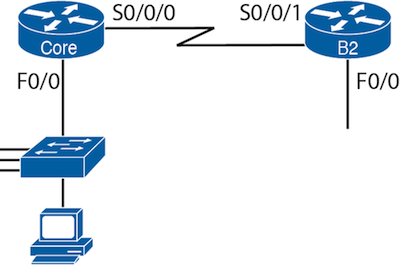
Figure 1: Sample Two Router, One Switch Topology
As another example, consider figure 2. From a quick analysis of the figure, you can see that the following devices and interfaces would be needed:
- Three routers, each with:
- Two serial interfaces
- One Ethernet interface of some type
- Three LAN switches
- Four Ethernet interfaces of some type
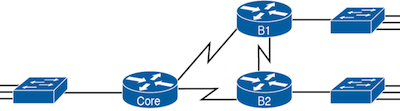
Figure 2: Sample Three Router Topology
Topologies Allow Lab Exeriments with Different Features
If you are reading this blog post before you have done a lot of your CCENT or CCNA study – which is a good time to start thinking about lab gear, by the way – you have a disadvantage in that you don’t yet know much about the you’ll be experimenting with using all this lab gear. If that’s you, and you look at figures 1 and 2 in this blog, it’s hard to know whether the first topology (with less gear) is enough gear to work with, or if you need the additional gear shown in the second topology. Do you need more? Less? And what benefits do you get with more or less gear, with more or less interfaces, to create different topologies?
As it turns out, even a single router, along with your existing PC, can help you learn some of what you need for CCENT and CCNA. Yes, a single router, even a single old (and cheap) router. Let me give you an example.
Say you buy one used Cisco router, with an old IOS (call it version 12.2), which would have been commonly used in production networks over 10 years ago. You already have a PC with an Ethernet port, and a serial port (USB or traditional). You buy a console cable to connect the PC to the router console, and buy crossover Ethernet cable to connect the laptop to the router’s Ethernet port (no LAN switch needed). You end up with the lab as shown in Figure 3:
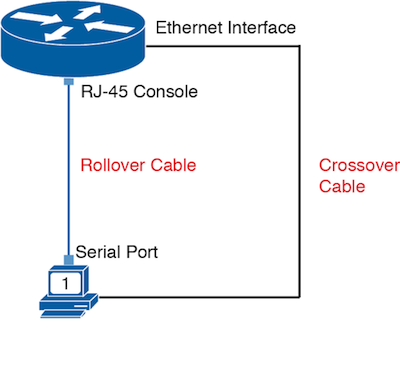
Figure 3: Single Router Lab
It seems almost too sparse, but you can still learn with this single router. For instance, you can:
- Learn basic CLI navigation through CLI modes
- Learn the configuration process
- Configure and test Telnet passwords
- Configure and test SSH passwords
- Set and test the enable passwords
- Configure and test hostnames
- Experiment with the ping command (simply)
- Configure and test router Ethernet settings (speed, duplex)
- Configure everything (but without the ability to test to see if many of those features work or not)
- Configure and test some other administrative settings
As you see, you can learn something even with a single router. In fact, if you have never seen a Cisco router or switch, I think it’s worth buying at least one router, just to learn how to connect to the console, and experience that directly.
Some Features Require More Nodes (Routers and Switches)
While the single-router topology of Figure 3 is useful, the simple fact is that for some features, you need more routers and more switches to do a meaningful lab for a given feature.
For instance, Open Shortest Path First (OSPF) is the one IP routing protocol discussed for the current CCENT certification. With one router, you can configure OSPF, but you cannot learn much about whether it works. OSPF works by communicating between routers, so you need at least two routers, like with the topology in Figure 1. However, OSPF also has features that make choices about alternate routes, and have at least three routers, with alternate routes, as shown in Figure 3, allow you to learn even more.
Summing up what you can do with one, two, and three router topologies with OSPF lab experiments:
- One router: Configuration only, with almost no useful learning about OSPF verification
- Two routers: Configuration, plus basic verification, and basic redundancy (with multiple links between the two routers)
- Three routers: Adds more interesting options for redundant routes and how OSPF uses them, plus more design options with OSPF areas
Finding the Main Topology Comparisons at Certskills.com
As I mentioned in the introductory post in this series, some topics about building a lab work better as a blog post, but others work well as reference material on a web page. Comparisons of topologies, and how they can be used to learn for CCNA, are best kept on a permanent web page. So, I’ve collected these kinds of notes at this web page for the CCNA exam:
http://certskills.com/LabGear/CCNA/Topologies.aspx
This page (and a similar one for the CCNP cert) shows several topologies of different sizes, some with routers, and some with switches. It also lists the kinds of features you can best learn with each topology – by adding more and more to make larger topologies, you can more features using features that make sense. So, rather than re-list this reference information here, take a look at the web page, and think about those options.
So, What Do You Plan to Do?
So, for those of you just getting into building your lab, what’s your current plan? After reading today’s post, are you thinking of starting out with enough gear for a two-router topology? Or even a single router? I’d be interested to hear.