
Config Museum: OSPFv2 Single Area Answers
As with all these #CCNA config museum pieces, the goal is to let you select some practice exercises to get in more reps and make configuration automatic. Today’s post shows the answers; useful links below, with the answers below the fold!
Commentary
The instructions give you some flexibility with the OSPF network commands, with the restriction that none of the commands match IP addresses outside the existing subnets. In other words, your network commands cannot match any IPv4 address that might be configured on new interfaces in the future. To do that, you could use a wildcard mask of 0.0.0.0 on all network commands, matching only the specific interface IP address, or a mask that is the inverse of the subnet mask, matching all IPv4 addresses in the subnet. I’ll show a configuration that uses 0.0.0.0 on R1 and R2, with the inverse masks on R3.
Next, the exercise asks you to set the OSPF router ID (RID), but to not use the OSPF router-id command. The only way to do that is to configure the IP address that is to be used as the RID on some interface. Loopback interfaces make the most sense for this purpose; the config shows interface loopback 1 on all three routers. You can use any subnet mask,but I used 255.255.255.248 for the loopback interface on all three routers, just for consistency.
Figure 1 repeats the initial design, and table 1 lists a reminder of the initial IP address configuration.
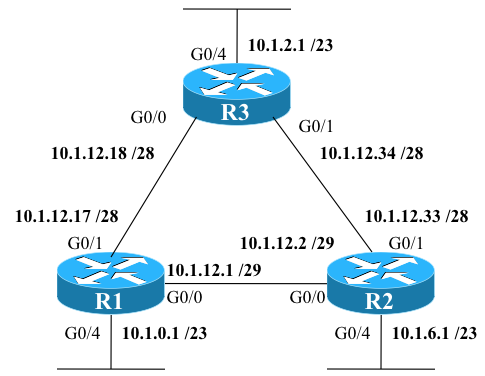
Figure 1: Network Design
Table 1: IPv4 Addresses
| Location | IP/mask |
| R1 G0/0 | 10.1.12.1 /29 |
| R1 G0/1 | 10.1.12.17 /28 |
| R1 G0/4 | 10.1.0.1 23 |
| R2 G0/0 | 10.1.12.2 /29 |
| R2 G0/1 | 10.1.12.33 /28 |
| R2 G0/4 | 10.1.6.1 /23 |
| R3 G0/0 | 10.1.12.18 /28 |
| R3 G0/1 | 10.1.12.34 /28 |
| R3 G0/4 | 10.1.2.1 /28 |
Answers
Examples 1, 2, and 3 show the answers. Note that some of the parameters in your answers may differ – feel free to follow up if you’re wondering whether your answer met all the requirements or not.
Example 1: R1 OSPFv2 Configuration
interface loopback1
 ip address 1.1.1.1 255.255.255.248

!
router ospf 1
 network 10.1.12.1 0.0.0.0 area 0
 network 10.1.12.17 0.0.0.0 area 0
 network 10.1.0.1 0.0.0.0 area 0
 passive-interface G0/4
Example 2: R2 OSPFv2 Configuration
interface loopback1
 ip address 2.2.2.2 255.255.255.248
!
router ospf 1
 network 10.1.12.2 0.0.0.0 area 0
 network 10.1.12.33 0.0.0.0 area 0
 network 10.1.6.1 0.0.0.0 area 0
 passive-interface G0/4
Example 3: R3 IPv4 Address Configuration
interface loopback1
 ip address 3.3.3.3 255.255.255.248

!
router ospf 1
 network 10.1.12.16 0.0.0.15 area 0
 network 10.1.12.32 0.0.0.15 area 0
 network 10.1.2.0 0.0.1.255 area 0
 passive-interface G0/4