
OSPFv2 Enabler #1 – Answers
The first OSPF Enabler exercise asked you to configure three routers, specifically to add the OSPFv2 network commands. This post lists the answers – simple enough.
The Topology
It is probably best to have the exercise post on the screen at the same time you look at this post. If not, for convenience, here’s a copy of the topology figure for this exercise.
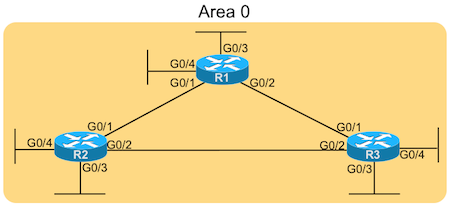
OSPF Enabler OSPF Topology 1
The Answers
I promised short, sweet, and to the point. Here are the answers!
router ospf 1
  network 172.16.0.0 0.0.255.255 area 0
  network 172.21.0.0 0.0.255.255 area 0
Answers: Router R1
router ospf 1
  network 172.16.12.0  0.0.0.3   area 0
  network 172.16.23.0  0.0.0.7   area 0
  network 172.22.2.0   0.0.0.127 area 0
  network 172.22.2.128 0.0.0.63  area 0
Answers: Router R2
router ospf 1
  network 172.16.13.3   0.0.0.0 area 0
  network 172.16.23.3   0.0.0.0 area 0
  network 172.23.33.3   0.0.0.0 area 0
  network 172.23.33.213 0.0.0.0 area 0
Answers: Router R3
Comments and Explanations – R1
For R1, you needed to start by identifying the various classful networks (class A, B, or C networks) used on the interfaces. Then, to configure one network command to match each classful network, you need to take the default mask for each classful network and invert the mask to find the corresponding wildcard mask. For default masks, those are:
Default mask 255.0.0.0 – Inverts to wildcard mask 0.255.255.255
Default mask 255.255.0.0 – Inverts to wildcard mask 0.0.255.255
Default mask 255.255.255.0 – Inverts to wildcard mask 0.0.0.255
For OSPF areas, in this case, all interfaces were in area 0, so all the network commands of course end with the area 0 keywords.
Comments and Explanations – R2
R2 requires the most thought. To get these commands totally correct per the requirements, you must:
- Begin with each interface’s IP address and subnet mask
- Calculate the subnet ID, which will be the first parameter in the network command
- Invert the subnet mask, which will be the second parameter in the network command
- The design places all interfaces in area 0, so the commands all end with area 0.
Because of how the exercise is worded, you should have four network commands, one matching the subnet off each of the four interfaces on R2.
Comments and Explanations – R3
R3 requires the least thought of the three requirements. To match a single IP address, use wildcard mask of 0.0.0.0. For the number preceding the wildcard mask in the network command, use the interface IP address. The result: each network command matches an interface IP address, and only that address, enabling OSPFv2 on that interface.
Also, as with all other cases in this lab, all interfaces were in area 0, so all the network commands of course end with the area 0 keywords.